benchmark · october 2026
We tested four free image to Word converters
run on october 21, 2026 · five pages · one run per tool
Ask an AI assistant for a free image to Word converter and you get a short list of names. We wanted to know which of them actually hand back a Word file you can work with — so we made five test pages, ran each through four free converters exactly as a visitor would, and scored every .docx that came back.
Disclosure first: we make one of the four, picturetotext.app. That is why the test pages, the expected answers and the scoring script are all published below — rerun them and check our numbers, including the ones where another tool beats us.
01The short answer
| Tool | Words read | Text in order | Tables right | Merged cells | Word equations | Headings (report) |
|---|---|---|---|---|---|---|
| picturetotext.app (ours) | 95% | 88% | 3 of 3 | 5/5 | 6/6 | 1 of 4 |
| Online2PDF | 93% | 91% | 2 of 3 | 5/5 | 0/6 | 3 of 4 |
| OnlineOCR.net | 90% | 51% | 1 of 3 | 6/5 | 0/6 | 0 of 4 |
| IMG Free Toolkit | 78% | 74% | 0 of 3 | 0/5 | 0/6 | 4 of 4 |
Words read is the share of the page's words found anywhere in the .docx; text in order also counts the order they come in, so a page whose columns come back interleaved scores low even when every word is there. Tables right means the Word file contains a real table with the same number of rows and columns as the page, on the 3 pages that have one. Averages are across all five pages.
- Best plain text on clean pages: Online2PDF — once you switch its OCR option on, which is off by default.
- Tables and maths: picturetotext.app was the only one to rebuild the table from the phone photo and the only one to produce real Word equations.
- Most private: IMG Free Toolkit runs its recognition inside your browser, so the image never leaves your device — but its tables and two-column text came back broken on every page we tried.
02The five test pages
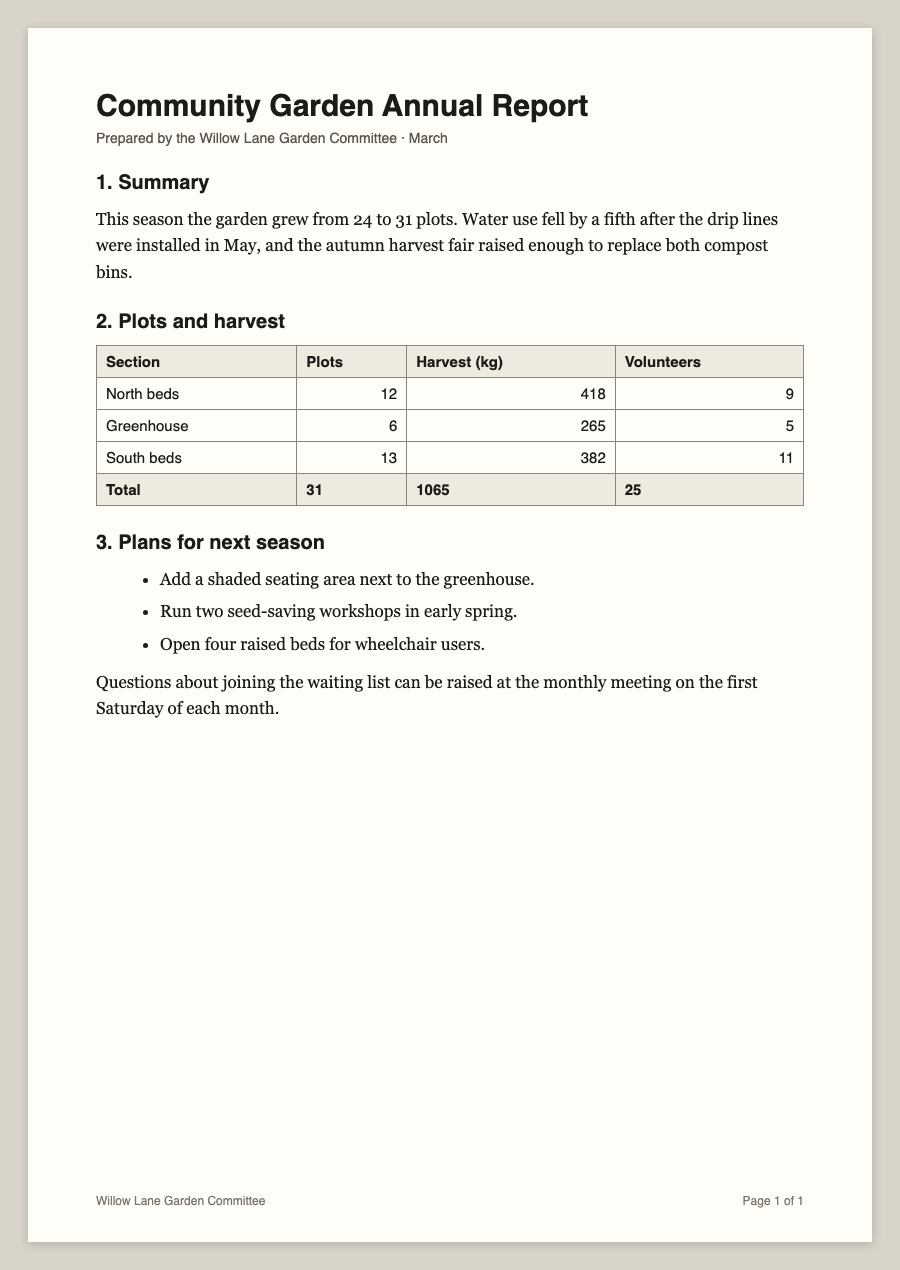
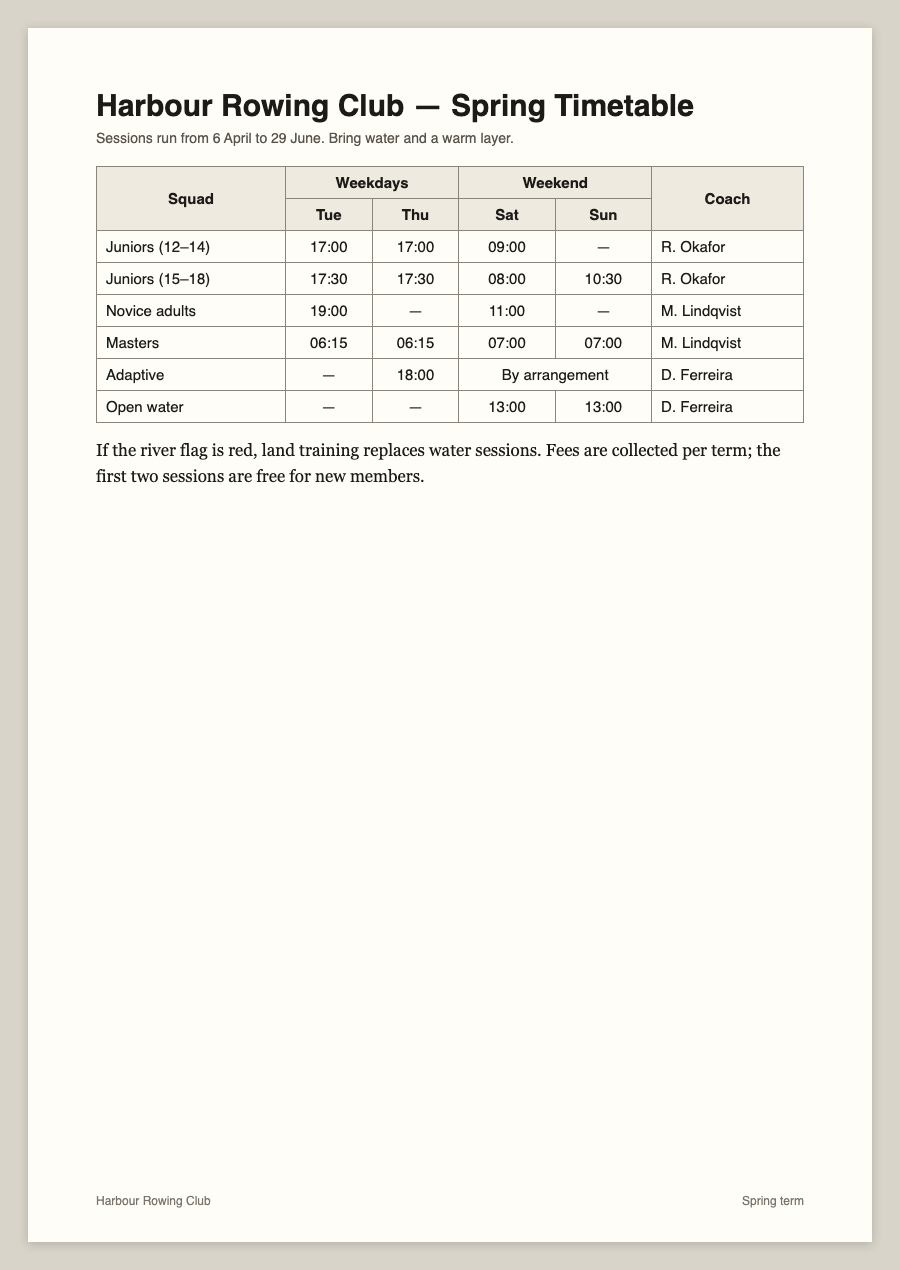
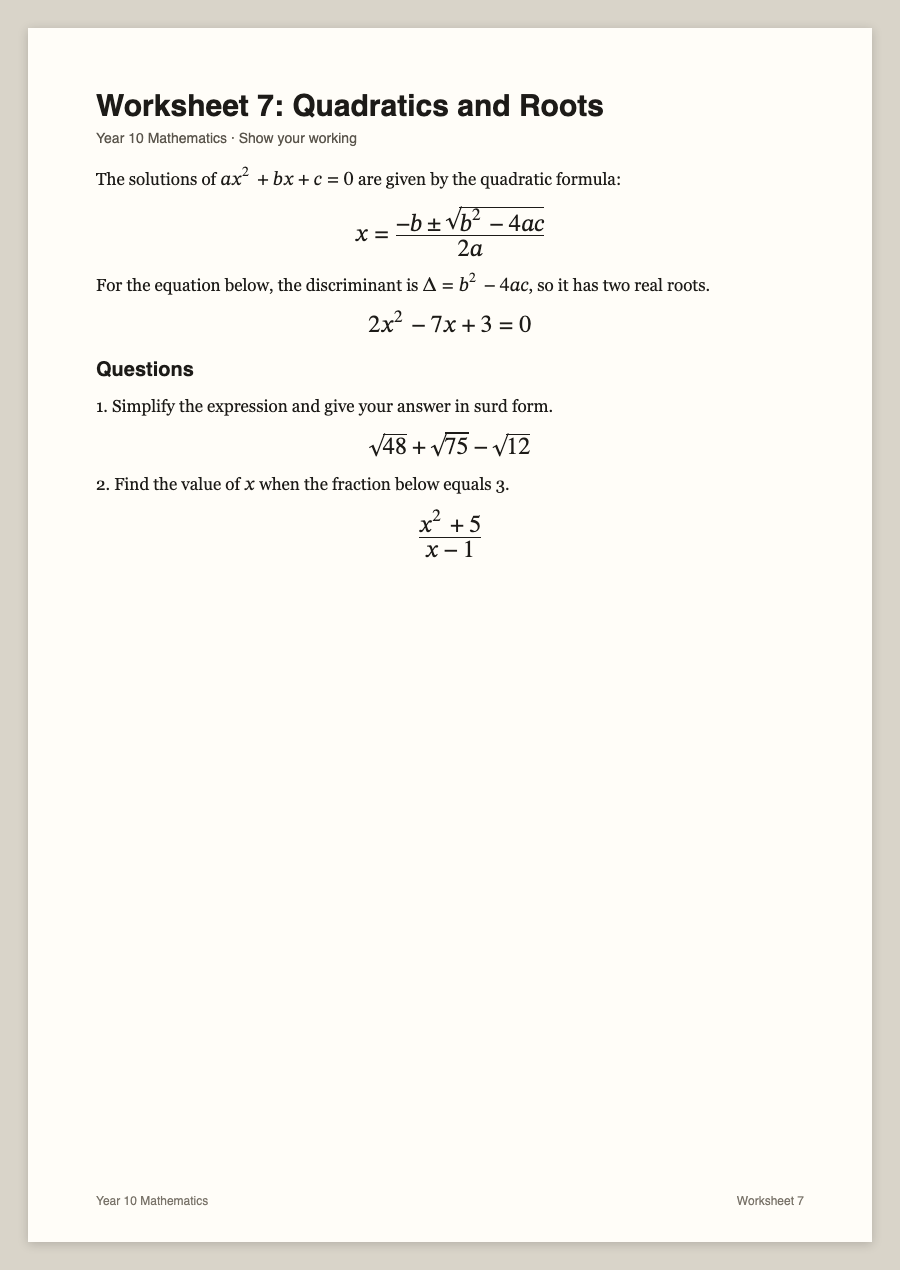
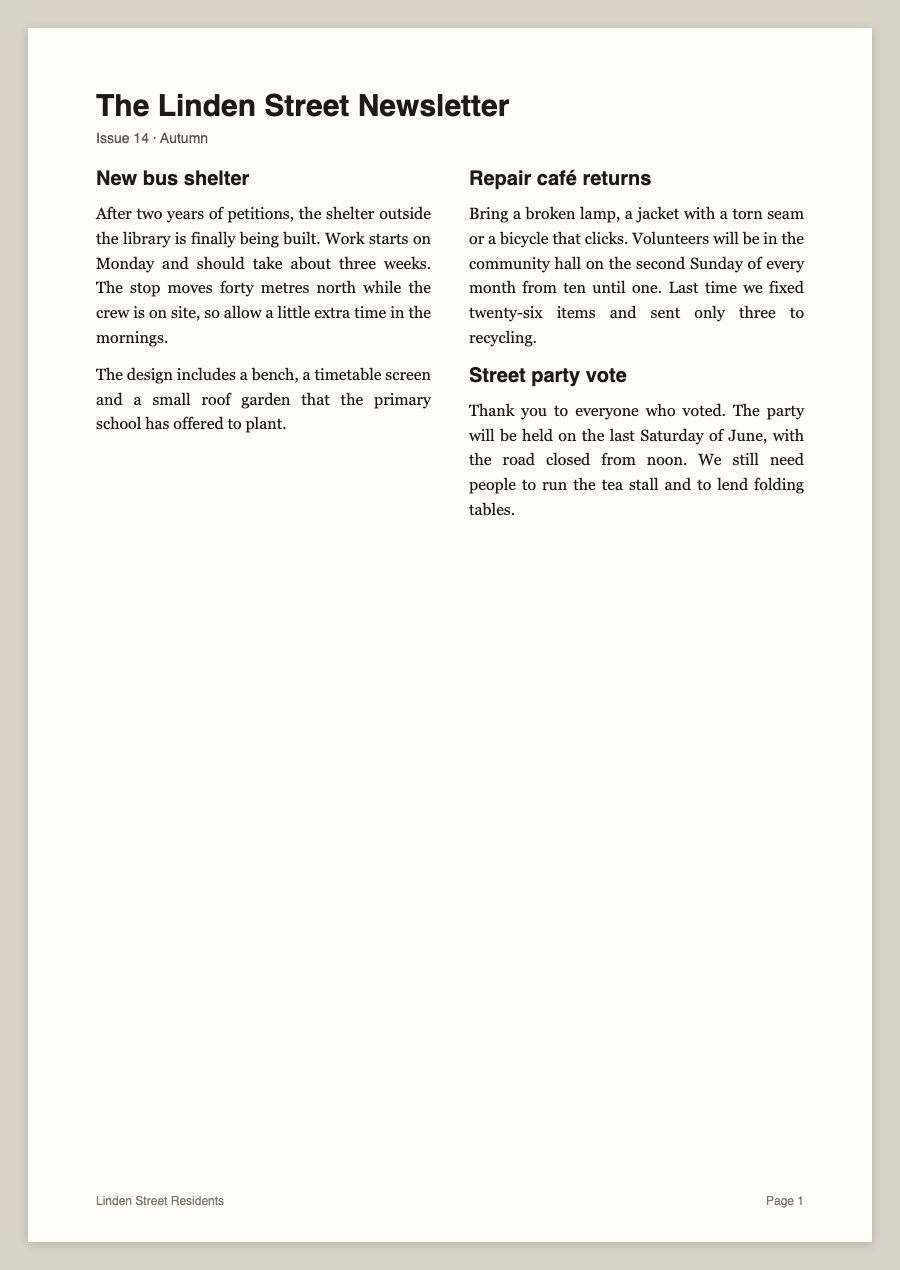
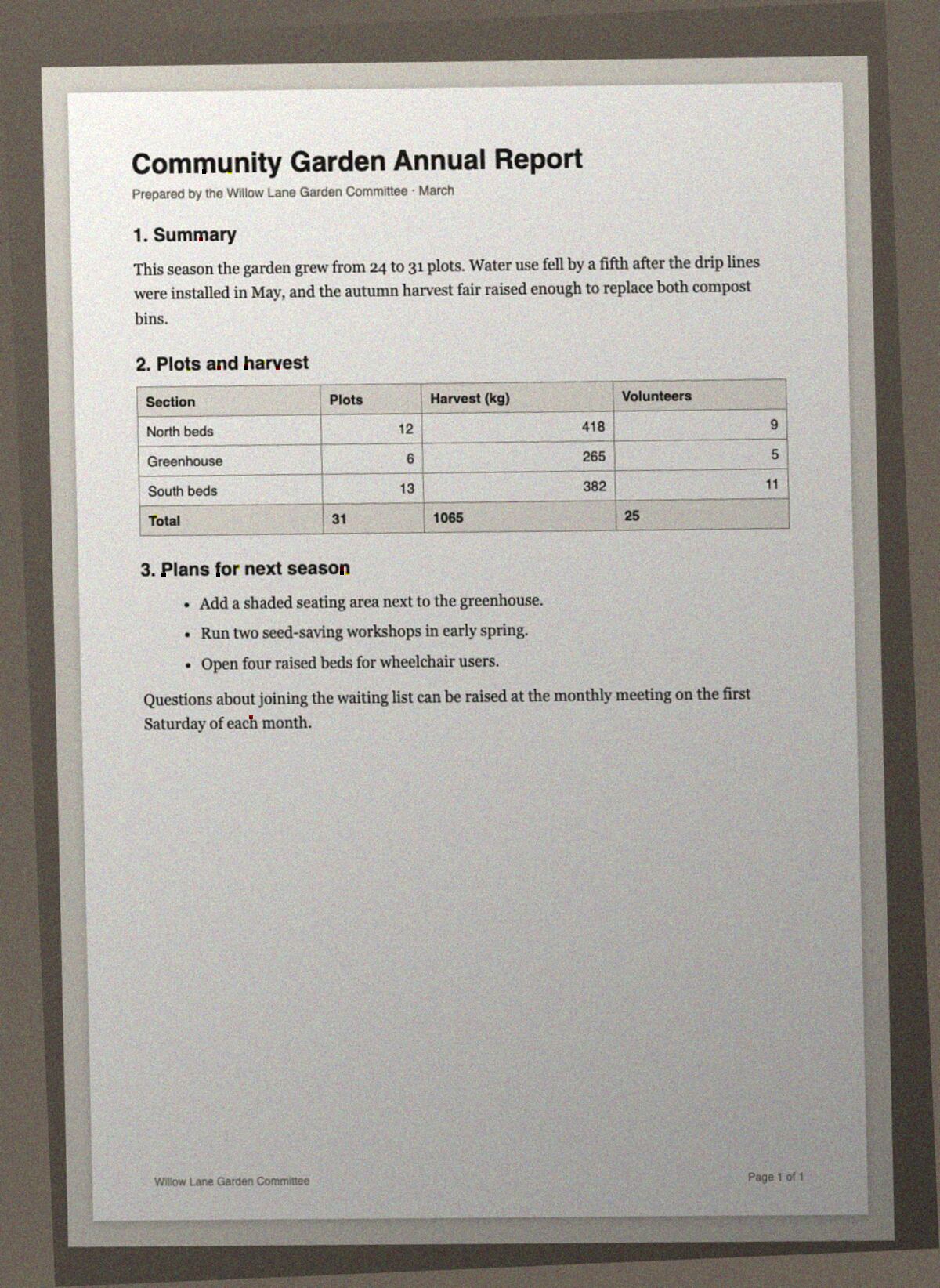
All five were made for this test, so every word on them is invented and the right answer is known exactly. Four are clean renders; the fifth is the report page turned into a phone snapshot — tilted, unevenly lit, noisy and saved as a JPEG.
03Page by page
| Page | picturetotext.app | Online2PDF | OnlineOCR.net | IMG Free Toolkit |
|---|---|---|---|---|
| Report | 94% words · 94% in order table ✓ | 95% words · 99% in order table ✓ | 93% words · 83% in order table 5×7 | 77% words · 83% in order table 2×6 |
| Timetable | 96% words · 93% in order table ✓ | 98% words · 100% in order table ✓ | 77% words · 79% in order table ✓ | 55% words · 58% in order table 2×8 |
| Maths worksheet | 92% words · 90% in order 6 equations | 92% words · 75% in order 0 equations | 97% words · 55% in order 0 equations | 90% words · 95% in order 0 equations |
| Newsletter | 97% words · 67% in order | 98% words · 95% in order | 95% words · 21% in order | 91% words · 49% in order |
| Phone photo | 94% words · 94% in order table ✓ | 81% words · 85% in order table 3×8 | 89% words · 19% in order no table | 79% words · 83% in order table 2×7 + 2×3 |
04What each tool did
Online2PDF
The strongest raw text of the group on the clean pages, and it rebuilt the timetable with all of its merged cells. Two things to know: the conversion only reads the text if you set “with OCR” in its options, and it is the slowest here (17 seconds to two minutes per page). It struggled where layout gets hard — the formulas came back as plain characters such as X=- -b + ../b2 - 4ac2a, and the table in the phone photo came back with the wrong shape.
OnlineOCR.net
Reads most of the words, but places much of the page in floating text boxes: the phone photo became 31 separate boxes with no table, and the newsletter's two columns came back in the wrong order. Guests can convert five files per hour; our sixth attempt was refused until the hour was up.
IMG Free Toolkit
The only tool that keeps your image on your device, and it marks headings as real Word headings. The cost of in-browser recognition showed in the structure: 0 of 3 tables came back with the right shape, the timetable lost all of its merged cells, and the newsletter's two columns were interleaved line by line.
picturetotext.app (ours)
3 of 3 tables came back with the right shape — including the one in the phone photo — with the timetable's merged cells at 5/5, and 6/6 formulas became editable Word equations. Where it lost points: spaces dropped inside table cells (“R.Okafor”), the one-line page footer left out, and three section headings printed only slightly larger than the body text turned into bold lines instead of Word headings. Its low “in order” score on the newsletter is a choice rather than a misread: it keeps the two columns side by side in the .docx, which the order metric counts against it while every word is there.
One more honest caveat: the same report page scored 100% in an earlier run of ours on the same day. Each tool was run once here, so treat differences of a few points as noise.
05Tools we could not include
- Google Docs (upload to Drive, open with Docs) — needs a signed-in account, so it could not be run the same way as the others. It is the next one we will add.
- Convertio — the conversion ran, but the download was refused to our test browser.
- Smallpdf has no image-to-Word converter, and WPS offers it only in its desktop app.
06How it was scored — rerun it yourself
Each .docx is opened as XML, nothing is judged by eye. Text is compared with the page's exact text (formulas excluded on both sides, since they are counted separately); tables are counted from the Word table grid; equations are Word's own equation objects; headings are paragraphs using Word's built-in Title or Heading styles.
- Test pages: report, timetable, maths, newsletter, phone photo
- Expected answers: truth.json
- Scoring script (Python, no dependencies): score.py
Every tool was used through its public web page with default settings, except Online2PDF's OCR switch, which has to be on for the comparison to mean anything. Ours was run through the same conversion a visitor gets, and its .docx built by the same code as the download button.
07Try the same pages
Drop any of the five pages into our image to Word converter, or go straight to the table or equation versions. If a result disagrees with this page, tell us through the contact page — we will rerun and update it.