image → .docx
Image to Word Converter
Turn a photo or screenshot of a page into an editable Word document, free, with no sign-up for a single image. A layout-aware OCR model reads the page and rebuilds its headings, paragraphs, tables, lists, equations and pictures as real Word elements — a .docx you can edit in Microsoft Word or Google Docs. Fonts and colours are not copied; the structure is.
pipeline
How it works
- 01UploadDrop, paste or choose a photo or screenshot of the document.
- 02ExtractLayout OCR reconstructs the structure — not just a wall of raw text.
- 03Download .docxThe Word file is generated in your browser. Copy as Markdown too.
a real run
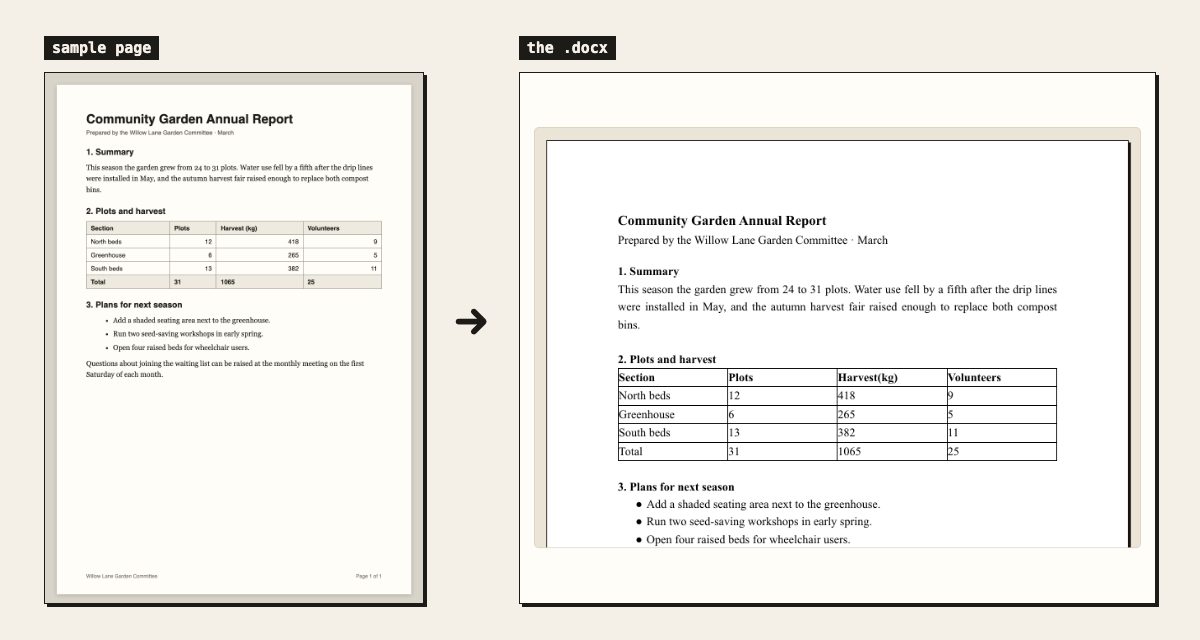
What one page looks like after
why this tool
Image to Word Converter, done right
the file itself
What comes back in the .docx
A converted page is not a picture pasted into Word. The image is read as a layout — a list of blocks, each with its position on the page and its role — and every block is rebuilt as the Word element it actually is. That is the difference you feel the moment you start editing: you click into a heading and retype it, drag a table column, or apply a Word theme to the whole document, instead of fighting a text box.
- Headings
- Titles and section headings come back as real Word headings, so the navigation pane and an automatic table of contents pick them up. One exception: on a page that has a large title, a small heading printed at about the body size becomes a bold line instead, so a bold label is not mistaken for a section.
- Paragraphs
- Body text is reflowed into normal paragraphs. The line breaks of the printed page are deliberately not carried over — you get sentences that rewrap as you edit, not one stiff line per printed line.
- Tables
- A printed table becomes a real Word table with its own rows and cells, editable cell by cell — borders in the original are not required for it to be found.
- Lists
- Bulleted and numbered lists keep their list formatting where the page marks them clearly enough to be certain.
- Pictures
- A photo, logo or figure sitting inside the page is cropped out of your original image and placed back into the document, in the spot it occupied on the page.
- Headers and footers
- A running header or a page number at the foot of the page becomes a real Word header or footer, instead of a stray line stranded in the middle of your text.
- Formulas
- A maths formula is rebuilt as a native Word equation you can click into and edit in the equation editor — not a picture of an equation.
- What is not kept
- Fonts, colours and exact margins are not reproduced. The output uses Word's default styling, which is exactly what makes it quick to edit and restyle.
two ways in
Editable Word text vs pasting the photo into Word
There are two ways to get a picture of a page into Word, and they answer different needs. Inserting the photo keeps the page looking exactly as it did, but every word is still pixels. Converting it reads the words and rebuilds them as text, which is what this tool does — and the price is that the page is retyped by a machine, so it is worth a read-through against the original.
- Insert the photo
- Word's Insert › Pictures puts the image on the page untouched. Nothing to proofread, but you cannot fix a typo, search for a name, copy a sentence or let a screen reader read it aloud.
- Convert it here
- The words become real Word text: headings you can restyle, table cells you can edit, a document you can search. Recognition can misread a smudged character, which is why the result is shown next to your image before you download.
- Need both?
- Convert the page, then insert the original photo at the end of the same document as a reference copy. Converting never touches your image; the .docx is a new file.
before you upload
How to photograph a page for a clean conversion
Nothing improves the Word file as much as the picture you start from. Layout recognition has to find the edges of paragraphs and table cells, so what it needs is a flat, evenly lit, straight-on view of the page — roughly what a scanner would give it.
- Fill the frame
- Crop out the desk. The more of the image the page occupies, the more pixels every character gets.
- Shoot straight on
- Photograph from directly above. A page shot at an angle has converging lines, and a table's columns stop being columns.
- Flat, even light
- Daylight beside a window beats a flash, which blows out glossy paper and drops a hard shadow across the gutter of a book.
- One page per image
- Two pages in one shot are read as a single page with an odd two-column layout. Photograph a spread as two images and drop them together.
- Screenshot when you can
- If the document is already on a screen, a screenshot is sharper than a photo of that screen and has no glare at all.
- HEIC and TIFF
- Convert them to JPG or PNG first — most browsers cannot decode those formats, so the upload fails before any recognition happens.
the fine print
Before you convert: formats, PDFs and privacy
- Input formats
- JPG, PNG and WebP — in practice any still image your browser can decode, including a screenshot pasted straight from the clipboard.
- Resolution
- Large photos are downscaled in your browser, to a 2048-pixel long edge, before anything is sent. Shooting at your camera's maximum resolution costs upload time and buys nothing.
- Not supported yet. For a scanned PDF, export or screenshot each page as an image and drop the images together.
- Several pages
- Up to 20 images in one batch on a free account, merged into a single document with one page per image — figures, logos and a header that repeats across pages included.
- Output
- Download .docx or .md, copy the Markdown, send it straight to Google Docs, or paste it into Notion. The .docx itself is assembled in your browser, on your device.
- Your image
- It is deleted within 30 minutes of the conversion, and the job record within two hours. Nothing is kept to train a model.
faq
Frequently asked questions
Is this image to Word converter really free?
Yes — no payment, no card, and no watermark or branding stamped into the .docx. A single image converts without an account; signing in, also free, is what unlocks dropping up to 20 pages at once into one document.
Will the Word file keep the original formatting?
Headings, paragraphs and tables are reconstructed by a layout-aware OCR model, so the .docx is structured like the original document. What does not carry over is the typography: fonts, colours and exact spacing are replaced by Word's default styling.
Can I convert a scanned PDF to Word?
PDF upload isn't supported yet — this tool takes images (JPG, PNG, screenshots). For a multi-page scan, photograph or screenshot each page and drop them together: up to 20 images merge into one document.
Why does Word export have a tighter daily limit than plain text?
Rebuilding a page as a document means reading its layout — where every heading, table cell and figure sits — which costs far more than reading the words alone. So conversions without an account are capped lower each day than plain text extraction, and a sign-in raises that cap.
What images work best?
Clear photos or screenshots of printed pages: letters, reports, book pages, forms. Straight-on shots with even lighting give the cleanest Word output.
Can I edit the Word file after downloading it?
Yes — that is the whole point of the conversion. Headings, paragraphs and tables are real Word elements, so you can retype, restyle and reformat anything. The file opens in Microsoft Word, Google Docs, LibreOffice and Apple Pages; Pages is the one exception worth knowing about, because it refuses tables nested inside other tables.
Does it handle multi-column pages, like a newspaper?
Usually, yes: columns that sit side by side on the page stay side by side in the .docx, laid out in an invisible table so each column reads top to bottom on its own. Copying text out still works column by column. A page with irregular boxes and pull quotes may come back simplified into a single column.
Are the pictures inside the page kept?
Yes. Figures and logos are cropped out of your original image and placed back into the .docx where they sat on the page, along with any running header. In a batch every image becomes its own page of one document, so the pictures come along there too.
Does the Word file keep the original fonts and colours?
No. The .docx uses Word's default styling — what carries across is the structure: heading, paragraph, table, list, equation. If you need a pixel-faithful copy of the original page, what you want is a scan or a PDF, not an editable Word document.
next door